Replaying the Engage tour and seeing what's new
Restart the guided tour of your Home page any time, and reopen the latest What's new announcement from your account menu.
Engage gives you a short guided tour the first time you land on Home, and it announces new features in a What's new window. If you skipped either one, or want a refresher, you can bring them back yourself.
Replay the tour
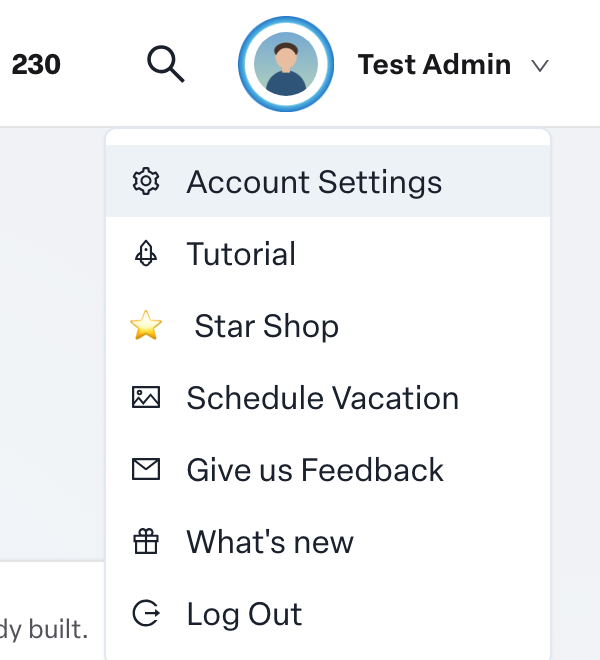
- Select your name or photo in the top right corner to open your account menu.
- Choose Tutorial.
Engage takes you to Home if you are somewhere else, then starts the tour. It points out the main parts of the page one at a time, such as your habits and the recognition feed. Steps for features your organization does not use are skipped automatically.
You can also start the tour from the Help section at the bottom of the left navigation by choosing Tutorial.
Habit tips
The first time you open a habit, Engage shows a short explanation of how to read your feedback, or why the habit is still locked if not enough people have rated you yet. These tips appear once per habit page type.
See what's new
When Humareso releases something new, a What's new window opens the next time you visit. Read through it, or choose Skip to close it. Once you close it, it will not pop up again for that release.
To read the latest announcement again:
- Open your account menu from your name or photo.
- Choose What's new.
If there is no announcement to show, nothing opens.
Find more help
The Help section of the left navigation also has Knowledge Base, which opens this support center, and Give Us Feedback, where you can tell us what you think of Engage. See How do I send feedback about Engage to Humareso?