Leave & PTO
Beginner
Set Notifications & Change Language
Choose how Leave reaches you, and switch between English and Spanish.
You control how Leave reaches you for each kind of update, and you can use Leave in English or Spanish.
Set Your Notifications
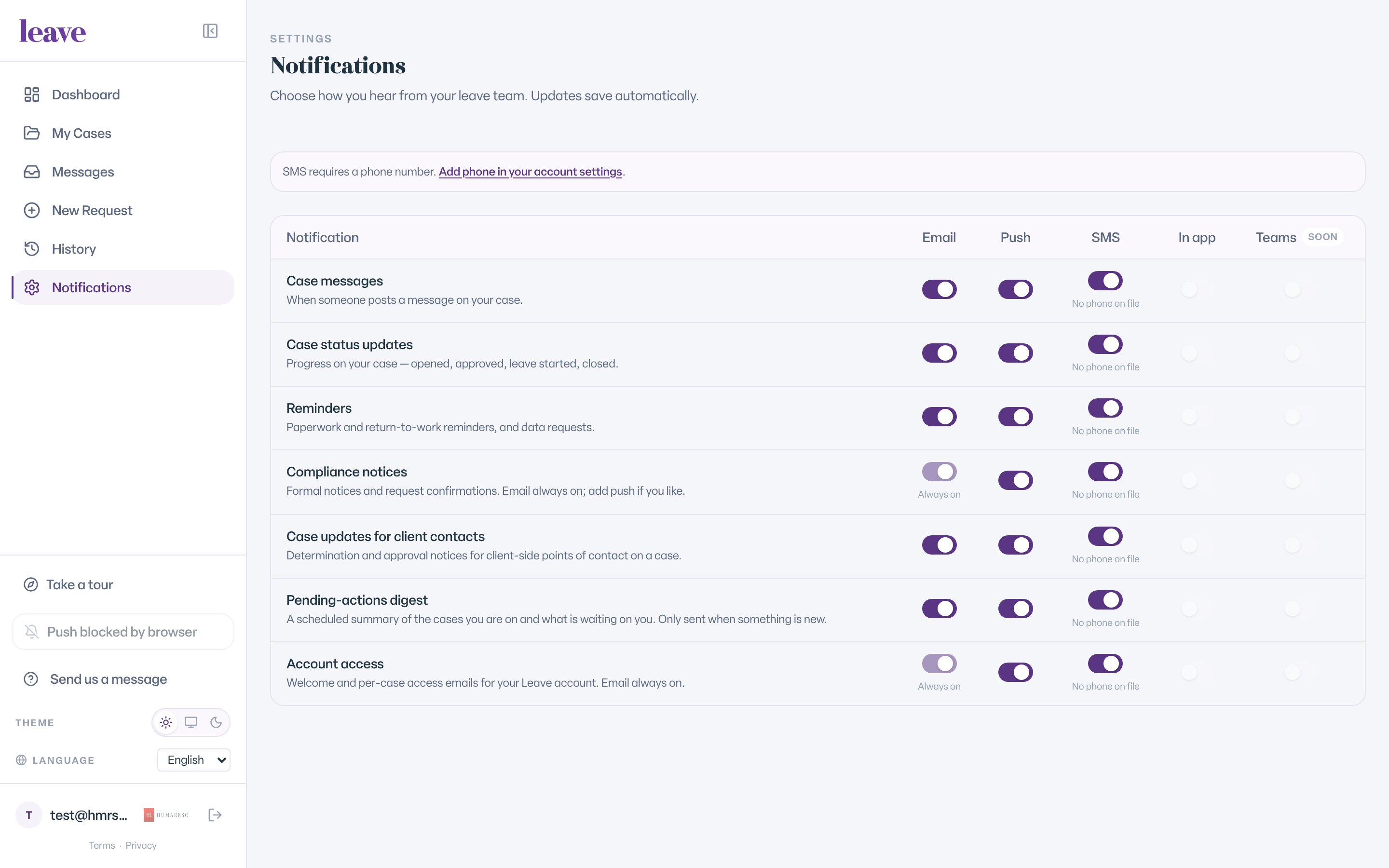
- Select Notifications under settings in the sidebar.
- Find the kind of update in the rows, such as Case messages, Case status, Reminders and Compliance notices.
- Turn on or off the channel you want: Email, Push, SMS or In app.
Changes save automatically. A Teams column is marked Soon and cannot be turned on yet.
What You'll See
- Compliance notices by email show Always on. These are legally required notices.
- SMS needs a phone number. If you have none, you see SMS requires a phone number. with a link to add one.
- Push works after you allow browser notifications. Use Turn on push notifications in the sidebar.
- Some channels are not available for every kind of update and show as off.
Change Your Language
Leave, including the request form, is available in English and Español. Use the Language selector at the top of the request form, or in the sidebar once you are signed in.
Todo el proceso está disponible en español.
Common Scenarios
- You want fewer emails. Turn off Email for the kinds of updates you do not need. Compliance notices stay on.
- You want texts. Add a phone number, then turn on SMS.
- Push shows as blocked. Allow notifications for leave.humareso.com in your browser settings.