How to Write Good Objectives and Measurable Key Results
An objective says where you are going. A key result is a number that proves you got there. Here is how to write both so Engage can track them.
Engage tracks objectives with key results: numbers that move from where you started toward a target. If a key result is written as a task, Engage has nothing to measure and the objective sits at 0%. This guide shows the shape that works.
An objective is an outcome
Write the objective as the change you want to see, in plain words, without a number in it. Grow self-serve revenue. Cut onboarding time for new managers. Ship the mobile check-in experience. If you could finish it in an afternoon, it is a task inside a bigger objective, not the objective.
Keep the description short and honest about why the objective matters. The people who follow it will read that line every time they open a check-in card.
A key result is a number you already track
Every key result in Engage is one of two kinds:
- A metric moves from a starting value to a target, in one direction. Self-serve MRR from 30k to 120k. Trial-to-paid churn from 8% down to 4%.
- A milestone is done or not done. Launch the new pricing page. Milestones count as 0% until you mark them done, then 100%.
Pick a metric wherever a number exists. A milestone is right for a launch, an approval or a decision, and wrong for anything that can be partly done.
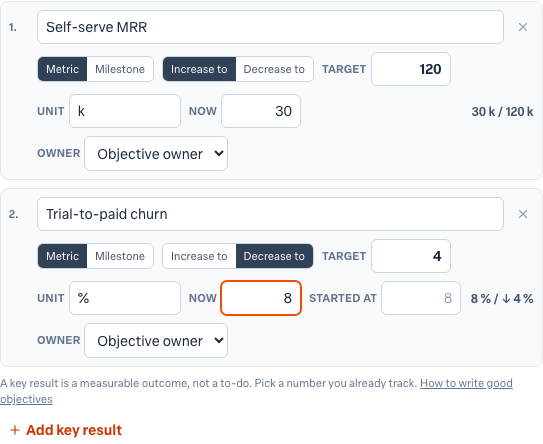
The editor asks for everything Engage needs to measure the key result: whether it is a metric or a milestone, whether the number should increase or decrease, the target, the unit, and where the number is now. For a decreasing metric it also asks where you started, so a churn rate that begins at 8% and targets 4% reads 50% complete when it reaches 6%.
Three checks before you save
- Is it an outcome or a task? "Fix the login page" is a task. "Cut login failures from 4% to 1%" is a key result. Engage flags task-shaped names as you type.
- Does the number exist? If nobody can tell you the current value, choose a number you can read today or make the key result a milestone.
- Is the target honest? A target you will certainly hit teaches nothing. A target you cannot hit stops people updating. Aim for something you would be proud to reach.
If you are stuck, press Suggest a measure under the key result. Engage proposes a metric, a direction and a target for the name you typed, and you can edit or discard the suggestion.
How many key results
Two to four per objective. One key result is usually the objective restated. Five or more means the objective is really two objectives, and the owner will stop updating the ones at the bottom.
Examples
- Grow self-serve revenue. Self-serve MRR from 30k to 120k. Trial-to-paid churn from 8% to 4%. Launch the new pricing page (milestone).
- Cut onboarding time for new managers. Days to first one-on-one from 21 to 7. Managers who completed the playbook from 0 to 40.
- Ship the mobile check-in experience. iOS beta users from 0 to 500. Crash-free sessions from 97% to 99.5%. App Store listing approved (milestone).
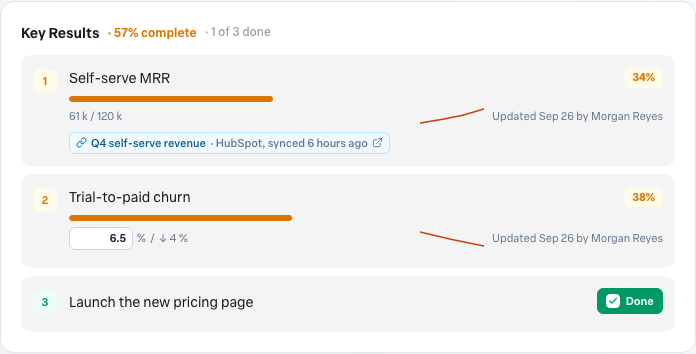
Once the objective is live, the owner keeps the numbers current from the objective page or the check-in card. Read Updating key results and checking in for that part, and download the OKRs 101 guide if your team is new to the method.
More in Objectives
- Using AI to draft objectivesBeginner
- Related objectives: parents and sub-objectivesBeginner
- Reading the completed objectives heatmap on your Team DashboardBeginner
- Using your Objectives board day to dayBeginner
- How do I see who changed a key result?Beginner
- Why can't I type a value into a key result?Beginner